How to Create Viral Short Videos Without Editing
If you have ever spent three hours staring at a complex video timeline, nudging audio clips by a millimeter, and adding "swoosh" sound effects just to get 114 views on TikTok, this article is for you.
There is a massive lie circulating in the creator economy right now: the belief that you need to be a professional video editor to go viral.
People are spending more time learning how to mask layers in CapCut than they are studying what actually makes humans stop scrolling. The truth? Some of the highest-converting UGC ads and most viral organic Reels on the internet have absolutely zero jump cuts, zero flashy text animations, and zero transitions.
If you want to create a viral short video without editing, you have to stop relying on post-production tricks and start relying on structure. Here is the anti-editing manifesto, and exactly how to use no-editing templates to grow your audience in a fraction of the time.
The CapCut Trap: Why Over-Editing is Killing Your Reach
Let's address the elephant in the room. Apps like CapCut are incredibly powerful tools for editors. But for founders, marketers, and everyday creators, they are massive productivity traps.
We call this Procrastination by Production.
Instead of posting three videos a day to test different messaging, creators spend an entire afternoon adding trendy overlays and aggressive zoom-ins to a single video.
But here is the data-backed reality: An edit cannot save a bad hook.
If your core message doesn't resonate in the first three seconds, no amount of flashy CapCut effects will keep the viewer watching. In fact, highly edited videos often trigger "ad blindness." Viewers immediately recognize high-production value as a marketing pitch and swipe away.
Raw, unedited, single-take videos feel native, authentic, and intimate. They feel like a FaceTime call from a friend, which is exactly what algorithms favor right now.
The Secret to No-Editing Virality: Structure > Transitions
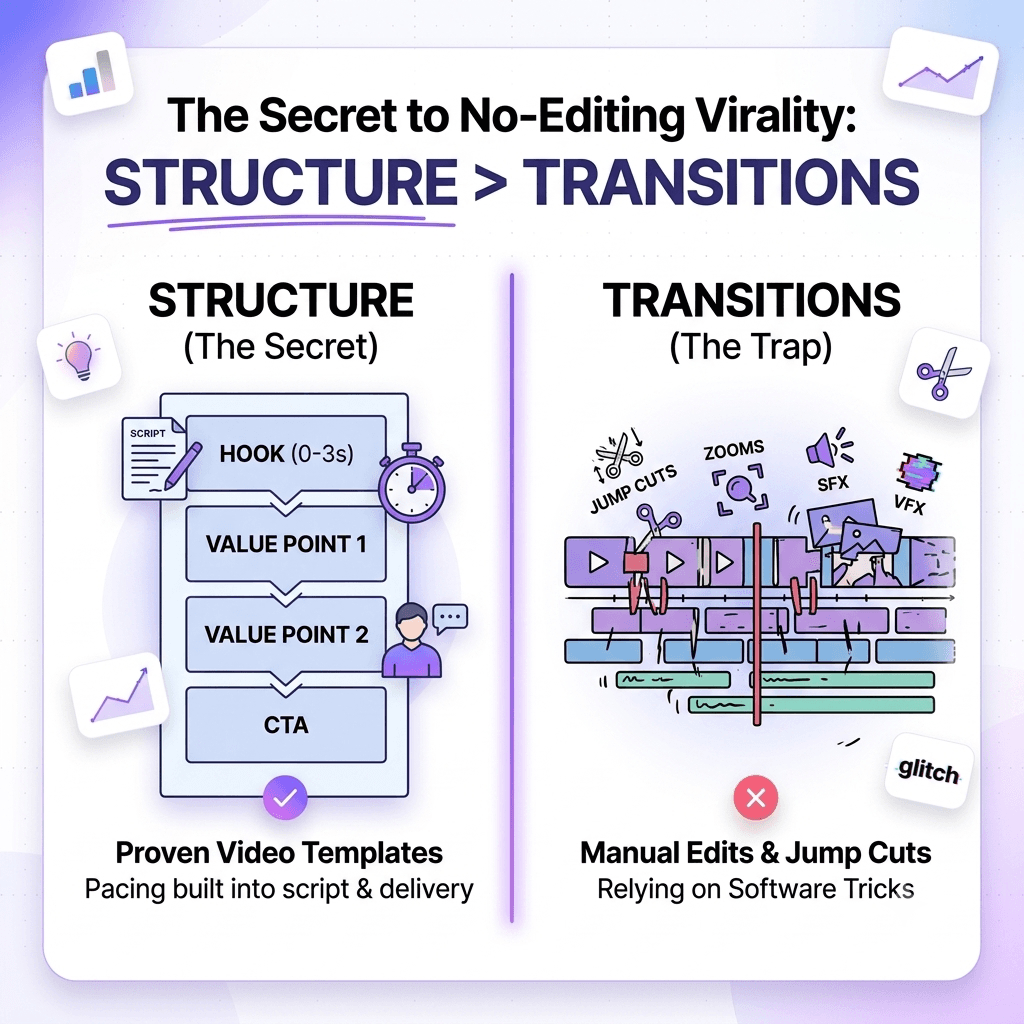
If you aren't going to use jump cuts to keep the viewer's attention, how do you retain them?
You replace the edit with a template.
When you use a proven video structure, the pacing is built into your script and your physical delivery, not your software. You simply hit record, deliver the template, and hit publish.
Here are three proven no-editing templates you can use today to generate high-performing content without ever opening an editing app.
No-Editing Template 1: The "Walk and Talk" Value Bomb
The easiest way to replicate the visual pacing of an edit without actually editing is to physically move your camera. Movement creates dynamic visual interest that keeps the brain engaged.
- The Setup: Hold your phone in selfie mode. Start walking outside or through your office.
- The Hook: Start speaking mid-stride. State a controversial opinion or a harsh truth.
- The Structure:
- Second 0-3: "The biggest mistake people make with [Topic] is [Common Belief]."
- Second 3-10: "You think doing [X] gets you [Y], but it actually ruins [Z]."
- Second 10-25: "Here is the 2-step system I use instead. First, [Action 1]. Second, [Action 2]."
- Second 25-30: "Save this video for the next time you need to do [Topic]."
- Why it works: The changing background of your walk provides the visual resets that an editor would usually have to create manually.
No-Editing Template 2: The "B-Roll + Native Text" Loop
This is the ultimate low-effort, high-reward format. You don't even need to speak.
- The Setup: Film a 5-to-7-second aesthetically pleasing, unedited clip of you doing something related to your niche (typing on a laptop, making coffee, packing an order).
- The Hook: Add a native text box directly inside Instagram or TikTok.
- The Structure:
- On-Screen Text: "How I achieved [Incredible Result] without [Common Pain Point]. Read the caption for the exact breakdown."
- The Caption: Write a highly detailed, valuable micro-blog post.
- Why it works: Because the video is only 5 seconds long but the caption takes 45 seconds to read, the video loops multiple times in the background. This tricks the algorithm into registering a 500% retention rate, pushing the video to the For You Page. Zero editing required.
No-Editing Template 3: The "Post-it Note" Presentation
Instead of adding text graphics in post-production, use physical props to create visual pattern interrupts in real time.
- The Setup: Write your 3 main points on three separate Post-it notes. Stick them to the wall behind you or hold them in your hand.
- The Hook: "If you want to [Goal], you only need to understand these 3 things."
- The Structure: Physically pull off or point to each Post-it note as you make your point.
- Why it works: The physical action of moving or revealing a prop acts as a natural transition. It builds anticipation (the viewer wants to see what the next note says) and requires absolutely zero software to execute.
How to Scale Your Content Without Software
The hardest part about the zero-edit workflow isn't filming—it's figuring out what to say that will actually hold attention. If you are stripping away the edits, your core framework needs to be flawless.
This is where Hook Clone changes the game.
Instead of guessing what structures work, HookClone analyzes the most viral videos in your niche and extracts their exact pacing and scripting frameworks into ready-to-use templates.
You don't need a timeline. You don't need to slice clips. You just take a proven HookClone template, fill in your niche's details, hit record, and post. It bridges the gap between raw, authentic filming and mathematically proven viral structures.
Stop Editing, Start Publishing
The next time you catch yourself spending 45 minutes trying to perfectly sync a trending audio clip to a text pop-up, stop. Delete the draft.
Pick up your phone, use one of the no-editing templates above, and speak directly to your audience. When you trade heavy editing for high-converting structures, you win your time back—and your views will follow.